X-ray source arcing

X-ray source arcing results in unstable XPS data and can also damage the x-ray source power supply or high voltage control.

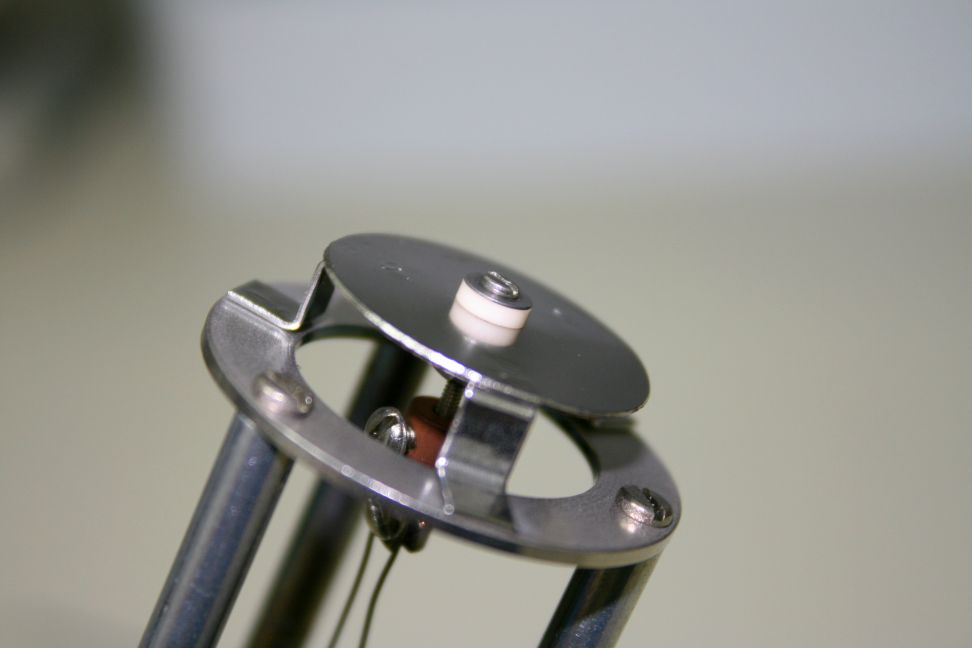
Typically X-ray source arcing is caused by contamination on the anode, a coated anode support ceramic (the football ceramic) or a loose filament.

However one unseen cause of x-ray source arcing is when the high voltage cable to the x-ray source is not tightened all the way down until it snaps in. The procedure is simple – line up the slot on the cable with the two little tabs on the source connector. Then press down all the way and turn the cable collar clockwise until it snaps in.

On the newer 04-548 15kV dual anode sources this is easy to do as the connector is exposed. But the connector is recessed on the older dual anode sources and all of the mono sources.

To properly connect the high voltage cable on the older dual X-ray sources or a mono source you need to remove the cover on the source so that you can see the connector and make sure that the cable slots line up and that the cable locks down when the collar is turned fully clockwise.

high-voltage-connector-slots

high-voltage-connector-slots

high-voltage-connector-snapped-in

high-voltage-connector-snapped-in

If the high voltage cable is not snapped all the way down then it can arc at higher voltages and damage the cable connector, the source connector, or more typically both connectors.

The pictures below show damaged cable and source high voltage connectors.

melted x-ray source connector

melted x-ray source connector


burnt x-ray source connector

burnt x-ray source connector


Once arcing damage occurs the cable end and or source connector need to be replaced.

RBD Instruments provides the source connector and we can also repair or exchange your cable. Visit our website and look under Parts – Optics – X-ray Photoelectron Spectroscopy Model 04-500 and04-548 X-ray source parts or call us at 541 550 5016

Revised outgas procedure for PHI dual anode x-ray sources and single anode mono sources.

Out-gassing the filaments and conditioning the anode are essential steps needed to remove adsorbed gases from the filament area of any PHI X-ray source.

Recently I have seen a couple of instances where a 10-610 monochromator source was not properly out-gassed and the result was a contaminated anode and very low counts. So degassing the anode is essential for proper operation.

To prevent anode contamination, the anode needs to be degassed per the PHI manual. However I have found that by changing the order of the out-gas procedure steps that the amount of time it takes to out gas the source to full power can be significantly reduced.

The manual states that the out-gas procedure sequence is as follows:

  1. Outgas the filaments
  2. Condition the high voltage
  3. Degas the anode

But from a practical standpoint it makes more sense to degas the anode before conditioning the high voltage. The reason is that a degassed anode is less likely to arc.

So the faster way to out-gas an X-ray source is:

  1. Outgas the filaments
  2. Degas the anode
  3. Condition the high voltage


Step 1. Outgas the filaments.

You need to out-gas the filaments after new filaments have been installed or anytime the system has been brought up to air and baked out. For this procedure it is assumed that the system has been baked out. (The only bake out exception is if you have just replaced the 04-303 ion gun ionizer and back-filled the chamber with dry nitrogen).

  1. Turn on the 32-095/096 power.
  2. On the 32-095/6, press the Blue Out/Act out-gas activate button.
  3. Select both filaments
  4. Select the Mg filament (or filament 1)
  5. Slowly increase the amps to 3.5
  6. Select the Al filament (or filament 2)
  7. Slowly increase the amps to 3.5
  8. Let the filaments sit there for a few minutes and then slowly increase each filament to 4.5 amps.
  9. Let the filaments sit at 4.5 amps for a minimum of 4 hours (overnight is best).
  10. After out-gassing for at least 4 hours set the filament current to zero on both filaments and turn off the Out/Act out-gas button by pressing it one more time.

Step 2 Degas the Anode

  1. Set the beam voltage to 500V and turn it on.
  2. On the 32-095/6, press the Blue Out/Act out-gas activate button
  3. Select the Mg filament (or filament 1)
  4. Slowly increase the amps to 3.5 and then monitor the anode current (emission current) meter.
  5. VERY SLOWLY increase the filament current until you get 1mA of emission current. Do not exceed 5 amps of filament current. Do not exceed 2mA of emission current.
  6. Monitor the ion gauge vacuum reading and wait until the out-gassing comes back down then slowly increase the beam voltage to 1 kV. If necessary reduce the filament current to keep the emission below 2mA.
  7. In steps of 1kV bring the high voltage up to 10kV while adjusting the filament current as needed to keep the emission current below 2mA. Do this over a period of 10 minutes to several hours, depending on how much the anode out-gasses. For best results keep the vacuum in the chamber in the low 10-9 Torr range. The higher the pressure from out-gassing, the more likely an arc will occur.
  8. Once the anode has been out-gassed to 10kV, turn the filament current to zero and set the high voltage to zero. Then switch to the other filament and repeat the procedure.

Step 3 Condition the high voltage

  1. Make sure that the Out/Act button is OFF and that the filament current is set to zero on both filaments.
  2. SLOWLY bring the high voltage up to 10kV while monitoring the vacuum chamber ion gauge.
  3. Step the high voltage up increments of 500V until you get to 16.5kV. When you see some signs of out-gassing (the pressure in the vacuum chamber will come up) then back down the high voltage a little bit and wait until the vacuum recovers.
  4. Once you are able to get to 16.5 kV with no arcing, let the anode sit there for at least 20 minutes.

The X-ray source is now ready for normal operation.   For best results, start at a low power and kV such as 100 watts and 10kV.   You can step up both the power and the kV over a period of a few hours based on how much out-gassing you see when operating in this mode. Once you are up to full power of 300 watts and 15kv the X-ray source can be brought up to full power quickly.


32-095 X-ray source control

When the 32-095 X-ray source control is not working properly there are some easy  possible solutions that you can check before sending the unit to RBD Instruments Inc. for repair.

If the problem is that one filament works but the other one does not, then you should check the fuses located on the filament power supply board inside the 32-095 X-ray source control in the back left hand corner of the unit. (The other possibility is that the x-ray source filament is open.)     With the 32-095 power off, slide the unit out and remove the cover, then measure the resistance on the fuses.  Usually it is easiest to just completely unplug the 32-095 and remove it from the electronics rack.

The fuses are 5 amp slow blow and are shown in the board layout figure below.

filament_board_fuses

Filament power supply board fuses

The next most common problem is instability in the controller or flashing digits on the digital panel meter. These can be caused by high AC ripple on the +/-15V or +5 V supplies on the local power supply board which is located in the front left hand side of the 32-095.

The figure below shows the layout of the local power supply board and the location of the +/-15V and +5V supplies.

local power supply board layout

local power supply board layout

The picture below shows the points where you measure the +5v supply.   To measure the +5V supply, connect your test clips to the pins as shown in the picture below. Turn on the 32-095 power and then measure both the DC and AC voltage using a DVM. The correct value is +5.0 V DC (+/- 100 mV) and the AC ripple should be less than 10mV.   If the +5V supply has a problem the DC will be more like 4V and the AC will be 1 to 2V.  Power supply board problems are usually caused by bad capacitors.


32-095 local power supply board +5V

32-095 local power supply board +5V

The pictures below show the test points for the + and – 15V supplies.   The correct voltage values are + and – 15.0V (+/- 200 mV) and the AC ripple should be less than 20mV. If the DC voltage is low and the AC ripple is high then the supply has a problem.

32-095 local power supply board -15V

32-095 local power supply board -15V

32-095 local power supply board +15V

32-095 local power supply board +15V

The figures below show the +5 and +/- 15V local power supply board schematics.

5V schematic

5V schematic

15 V schematic

15 V schematic


Below is a table that lists common problems and possible solutions.   Sometimes the problems are easy to fix, but often the problem may be a hard to find bad capacitor, diode or integrated circuit.

Problem Possible solution
No current on one filament Bad power supply board fuse, open filament on source
No filament current but fuse is OK Bad PIC 645 regulator
Unstable operation Bad capacitor on local power supply board

If the problem is not an easy fix then RBD Instruments can repair your 32-095/96 x-ray source control and also provide you with a loaner unit to use while we are repairing yours.

Additional test info:

04-500/548 X-Ray Source Filament Test

The following information is helpful in testing the condition of the filaments in 04-500 or 04-548 15 kV dual anode X-ray sources and in troubleshooting the 32-095 X-ray source control.

 X-Ray Sources

On the big filament connector on the source, pins A and B (filament 1) and C and D (filament 2) should have less than 1 ohm of resistance. All pins should be open to ground.

The HV connector (anode) should be open to ground. Check that with the X-ray high voltage supply OFF and the HV cable to the source disconnected.

32-095 Test

Follow the 32-095 Outgas/Activate procedure in the 32-095 manual.

To bench check the 32-095, short pins A and B on the Pressure Interlock connector, and pins A and E on the Pump Control connector.

You can use two large paper clips as dummy loads when testing the filament current.  Put the clips on the end of the cable or on the filament connector on the back of the 32-095.

32-095 outgas activate  test load

High voltage switch connections:

32-095 HV switch connections

V4 Differential Valve Problem

V4 Differential Valve Problem

This post describes how to fix the problem of the V4 differential valve not opening on an AVC when the DIFFY PUMP ION GUN button on the AVC remote box is depressed.  Look at the photos at the bottom of the post for additional information.

The AVC (Auto Valve Control) has two DV6M thermocouple gauge tubes which are used to monitor the vacuum levels in the load lock and at the turbo pump. In the case of systems that have two turbo pumps, the second thermocouple gauge tube monitors the ion gun differential pumping turbo. The load lock TC gauge tube is located on under the load lock or in some cases as shown below, under the table top.

The AVC displays the vacuum level of the load lock thermocouple gauge at all times with the exception of when the DIFFY PUMP ION GUN button on the AVC remote box is depressed. In that case the AVC will momentarily monitor and display the turbo pump thermocouple gauge tube. If the vacuum level is sufficient then V4 will open. Monitoring the turbo pump vacuum is a built in safety feature of the AVC to prevent the chamber from being dumped in case the DIFFY PUMP ION GUN button on the AVC remote box is depressed while the turbo pump is off or not up to speed.

A not uncommon problem with the AVC unit is that the V4 valve will not open when the DIFFY PUMP ION GUN button on the AVC remote box is depressed.

The most common solution to this problem is that the turbo pump thermocouple gauge tube is not working properly or is not matched closely enough to the load lock gauge tube. Here is how you can test the ion gun gauge tube –

  1. Press the PUMP INTRO button on the AVC remote and pump out the load lock until you have 5 bars displayed on the AVC remote.
  2. On the back of the AVC (located on the back of the vacuum console), remove the TC1 gauge cable. TC1 monitors the load lock.
  3. Unplug the TC2 cable and move it into the J1 connector where you just unplugged TC1.
  4. Look at the AVC remote box. If the turbo pump thermocouple gauge is working properly you will see 4 bars displayed. After 2 minutes you should see 5 bars displayed.   If only 3 bars are displayed you can adjust the AVC so that V4 will open by following the steps in this older blog post – https://www.rbdinstruments.com/blog/auto-valve-control-adjustment-procedure/

If only 2 bars are displayed then the next step would be to try replacing the DV6M thermocouple gauge tube. There is only one TC controller (Hastings T6 called the hockey puck because of its shape) inside the AVC and a relay switches between the two thermocouple gauge tubes when the DIFFY PUMP ION GUN button on the AVC remote box is depressed. If the two thermocouple gauge tubes do not have similar offset and gain properties then the only solution is to replace the turbo pump DV6M thermocouple gauge tube or the intro thermocouple gauge tube in order to get them to match more closely. If the AVC reads 1 bars all the time then the hockey puck may be defective.

Usually though, the problem is that the K3  thermocouple relay inside the AVC is not switching. Or the contacts on the relay may be dirty. In the case of the older Blue plastic relays it is common for the plastic switch throw to be cracked at the top in which case the relay may close but not all the way and so the turbo pump thermocouple gauge is not read at all.    The RBD Instruments part number for the blue/yellow K3 relay is PN K3AVC24RE.

If when you swapped TC1 and TC2 only one bar was displayed, then most likely the relay I broken or the contacts are dirty. Here is how to address that problem;

  1. The easiest way to get to the back of the AVC is to come in through the top. So, remove the wooden table tops and the aluminum ones that are towards the back of the vacuum console.
  2. Close all valves on the AVC and also turn off the turbo pump (s).
  3. Turn off the AVC control power.
  4. Remove cables from the back of the AVC, including the power cord.
  5. Unplug the air manifold cable and remove the gas manifold from the AVC (2 to 4 screws) The air-lines stay connected to the manifold and the compressed air that is connected the back of the vacuum chamber stays on..
  6. Remove the AVC control and unplug the 40 pin remote box ribbon cable.
  7. Place the AVC control on a work bench or table and remove the cover.
  8. Inspect the TC relay K3 (on older AVCs there are only 2 relays and the thermocouple gauge relay is the left one). If you have a newer AVC with 3 relays, the TC relay is the far left one. The far right one is the up to air relay. If it is the old blue relay you can remove the two mounting screws on the back of the AVC to make the relay more accessible.
  9. If the TC relay is the old Blue plastic type(RBD part number PN -K3AVC24RE),  then most likely the relay contact pull piece is broken at the top. If you remove the cover you can inspect the top part of the pull piece and if it is cracked then the relay needs to be replaced. (You can also just move a new pull piece over from a new relay rather than unsolder the relay).
  10. If the TC relay is the newer style then most likely the contacts are oxidized and you will need to clean the contact with some fine sand paper or emery cloth followed by paper soaked in isopropanol to remove the residual small particles. (Or you can replace the relay with a new one).
  11. To clean the contacts, unplug the relay from the socket and remove it from the AVC.
  12. Remove the plastic cover from the relay (it snaps on so use small screwdriver to un snap it) then clean the contacts.
  13. You can measure the resistance on the contacts with an ohm meter and manually move the relay throw to switch between the two sets of contacts.
  14. Reinstall the relay.
  15. Reinstall the AVC control and reconnect the gas manifold and all the cables.

That should do it!   If not then please contact RBD Instruments Inc. for more assistance. We can repair your AVC controller and also provide DV6M thermocouple gauge tubes.

RBD Instruments Inc. www.rbdinstruments.com 541 330 0723

This slideshow requires JavaScript.