PHI 15kV Dual Anode X-ray Source Outgas Procedure

This is the procedure that I use to ensure proper outgassing and conditioning of the PHI 04-500 and 04-548 15kV Dual Anode X-ray source after installation or bake-out. It is a slight variation from the procedure in the 32-095 out-gas activate procedure.

Initial Installation

After installing the source, the system must be pumped down and baked out. If you are unable to bake-out the system, you should at a minimum wrap some heat tape around the flange on the source and heat it to 150 degrees C for a period of 8 to 12 hours.

After the bakeout is complete, reconnect the water lines and check for leaks by turning the x-ray source control on for 15 minutes. Sometimes there are small leaks that form a drop or two after 5 minutes. If there are no leaks after 15 minutes you can shut off the x-ray source control and connect the high voltage lead, the Teflon shield and the second cover.

Note: Make sure that the high voltage wire is tight and that the water flow is correct. See the info at the end of this procedure for more details.

Outgas the filaments

  1. Turn on the 32-095/096 x-ray source control and press the Outgas/Activate button. Select both anodes and slowly ramp up each filament to 2 amps. Now, using the ion gauge as a guide, increase the filament current in ½ amp increments until you see some out gassing (usually around 3 amps).
  2. Over the next hour, ramp the filament current up to 4.5 amps on both filaments. Allow the source to sit at 4.5 amps for a minimum of 4 hours, overnight is better.
  3. After the filaments have operated at 4.5 amps for at least 4 hours, ramp them up to 5.0 amps for 30 minutes.
  4. Press the Outgas/Activate button to turn the filaments OFF and let them cool for 15 minutes.
  5. Proceed to high voltage conditioning.

High Voltage Conditioning

  1. Make sure that the filaments are OFF.       Turn the high voltage rheostat on the high voltage control fully CCW and then press the red High Voltage button on the X-ray source control.
  2. Slowly turn the high voltage rheostat CW and bring the high voltage up to 5 kV. Observe the ion gauge for signs of out gassing and slowly bring the high voltage up to 8kV. The red light on the x-ray source control should stop flashing.
  3. Over the next hour or so, slowly bring the high voltage up to 16.5kV.   Observe the ion gauge for signs of out gassing. If you see the pressure rise, back off on the high voltage a little bit and wait a few minutes.   What works best is to bump up the high voltage in 500 volt increments and then to let if sit there while you go do something else.   Periodically come back and bump it up another 500 volts.   You can probably go up to 10kV fairly quickly, but after that you should go more slowly. The higher the kV, the more slowly you should go. Think of a rubber band that is being stretched. The further you pull it, the more likely it will snap.
  4. Note: The vacuum should be in the low 10-9 range when conditioning the high voltage. When the source outgases and the vacuum comes up into the mid 10-8 range, you should wait for the vacuum to go back into the 10-9 range. If the vacuum gets into the high 10-8 range the chances for an arc are good. It is best to bring it up slowly and not get any arcs as opposed to trying to force the outgas process. This takes time, be patient!
  5. Once you have the high voltage up to 16.5kV, leave it sit there for 30 minutes.
  6. Proceed to final conditioning.

Final Conditioning

  1. Turn on the high voltage and set it to 10kV.
  2. Power both filaments and bring up the power to 50 watts on both the Al and Mg anodes.
  3. Observe the ion gauge for signs of out gassing and let the source sit there until the vacuum returns to the low to mid 10-9 range.
  4. Increase the power to 100 watts per anode and increases the high voltage to 11kV.
  5. Slowly step the power up in 50 watt increments and the high voltage in 500 volts increments until you are at 250 watts per anode @ 15kV. This can take several hours.
  6. Leave the source sit there for an hour or more, until the vacuum returns to the low to mid 10-9 range.
  7. Decrease one anode to zero power and increase the other anode to 300 watts @ 15kV. Observe the ion gauge for signs of out gassing.   If necessary, wait for the vacuum to return to the low to mid 10-9 range.
  8. Set that anode power to zero and bring the other anode up to 300 watts @ 15kV and observe the ion gauge.
  9. Once both anodes can run at 300 watts @ 15kV and the vacuum stays in the low to mid 10-9 range, then the source is fully out gassed and can be operated normally.
  10. If you wish to go to 400 watts you will need to run it up slowly from 300 to 400 watts the first time and let it sit there for a while.

Revised outgas procedure for PHI dual anode x-ray sources and single anode mono sources.

Outgassing the filaments and conditioning the anode are essential steps needed to remove adsorbed gases from the filament area of any PHI x-ray source.

Recently I have seen a couple of instances where a 10-610 monochromator source was not properly outgassed and the result was a contaminated anode and very low counts. So degassing the anode is essential for proper operation.

To prevent anode contamination, the anode needs to be degassed per the PHI manual. However I have found that by changing the order of the outgas procedure steps that the amount of time it takes to outgas the source to full power can be significantly reduced.

The manual states that the outgas procedure sequence is as follows:

  1. Outgas the filaments
  2. Condition the high voltage
  3. Degas the anode

But from a practical standpoint it makes more sense to degas the anode before conditioning the high voltage. The reason is that a degassed anode is less likely to arc.

So the faster way to outgas an X-ray soure is:

  1. Outgas the filaments
  2. Degas the anode
  3. Condition the high voltage

Step 1. Outgas the filaments.

You need to outgas the filaments after new filaments have been installed or anytime the system has been brought up to air and baked out. For this procedure it is assumed that the system has been baked out. (The only bake out exception is if you have just replaced the 04-303 ion gun ionizer and backfilled the chamber with dry nitrogen).

  1. Turn on the 32-095/096 power.
  2. On the 32-095/6, press the Blue Out/Act outgas activate button.
  3. Select both filaments
  4. Select the Mg filament (or filament 1)
  5. Slowly increase the amps to 3.5
  6. Select the Al filament (or filament 2)
  7. Slowly increase the amps to 3.5
  8. Let the filaments sit there for a few minutes and then slowly increase each filament to 4.5 amps.
  9. Let the filaments sit at 4.5 amps for a minimum of 4 hours (overnight is best).
  10. After outgassing for at least 4 hours set the filament current to zero on both filaments and turn off the Out/Act outgas button by pressing it one more time.

Step 2 Degas the Anode

  1. Set the beam voltage to 500V and turn it on.
  2. On the 32-095/6, press the Blue Out/Act outgas activate button
  3. Select the Mg filament (or filament 1)
  4. Slowly increase the amps to 3.5 and then monitor the anode current (emission current) meter.
  5. VERY SLOWY increase the filament current until you get 1mA of emission current. Do not exceed 5 amps of filament current. Do not exceed 2mA of emission current.
  6. Monitor the ion gauge vacuum reading and wait until the outgassing comes back down then slowly increase the beam voltage to 1 kV. If necessary reduce the filament current to keep the emission below 2mA.
  7. In steps of 1kV bring the high voltage up to 10kV while adjusting the filament current as needed to keep the emission current below 2mA. Do this over a period of 10 minutes to several hours, depending on how much the anode outgasses. For best results keep the vacuum in the chamber in the low 10-9 Torr range. The higher the pressure from outgassing, the more likely an arc will occur.
  8. Once the anode has been outgassed to 10kV, turn the filament current to zero and set the high voltage to zero. Then switch to the other filament and repeat the procedure.

Step 3 Condition the high voltage

  1. Make sure that the Out/Act button is OFF and that the filament current is set to zero on both filaments.
  2. SLOWLY bring the high voltage up to 10kV while monitoring the vacuum chamber ion gauge.
  3. Step the high voltage up increments of 500V until you get to 16.5kV. When you see some signs of outgassing (the pressure in the vacuum chamber will come up) then back down the high voltage a little bit and wait until the vacuum recovers.
  4. Once you are able to get to 16.5 kV with no arcing, let the anode sit there for at least 20 minutes.

The X-ray source is now ready for normal operation.   For best results, start at a low power and kV such as 100 watts and 10kV.   You can step up both the power and the kV over a period of a few hours based on how much outgassing you see when operating in this mode. Once you are up to full power of 300 watts and 15kv the X-ray source can be brought up to full power quickly.


PS RBD Instruments provides all of the replacement parts for the 04-500 and 04-548 15kV dual anode x-ray sources. Contact us for more information.

Argon, Oxygen and Xenon refill service for PHI systems

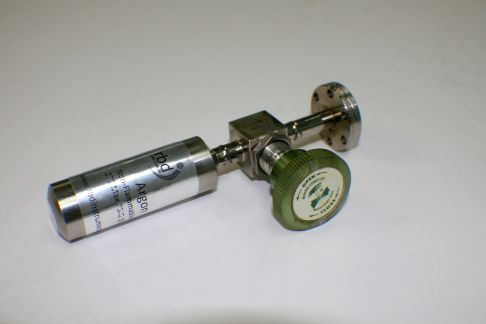
RBD Instruments provides a refill service for the Argon, Oxygen, and Xenon gas bottles that are used with the PHI 04-303 and 06-350 sputter ion guns on many x-ray photoelectron and Auger spectrometers.

argon-bottle

argon-bottle


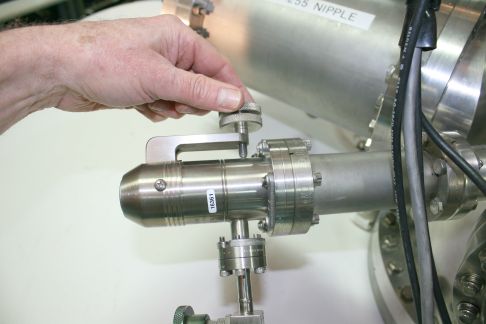
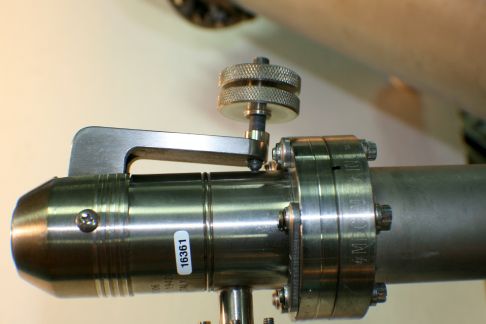
When you replace the argon or oxygen bottle on your PHI system, a small volume of air is introduced between the bottle and the leak valve. This air needs to be pumped out. The process for replacing the bottle and pumping out the air is different for systems with and without poppet valves. Both procedures are provided here.

 Replacing Bottles on Systems without a Poppet Valve

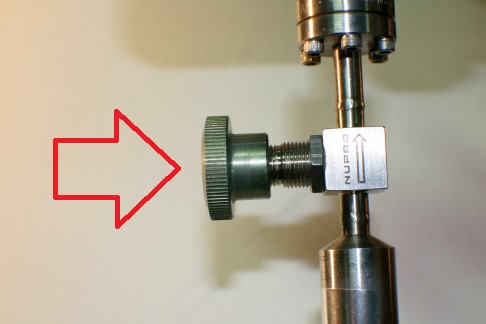
1. Close the leak valve.

2. Keeping the valve on the new bottle closed, remove the old bottle and install the new one.

3. Turn off all filaments on the system, including the DIG.

4.Turn off the Boostivac ion pump control.

5. Open the leak valve all the way.

6. Turn on the turbo pump and pump intro.

7. After the turbo has reached full speed, open the V1 gate valve and pump out the system for about 10 minutes with the turbo pump.

8.Close the V1 gate valve.

9.Start the ion pumps.

10 Turn on the DIG.

11. Pump until the base vacuum returns to normal.

12. Close the leak valve.

13. Open the argon bottle.

 Replacing Bottles on PHI systems with a Poppet Valve

1. Close the leak valve.

2. Keeping the valve on the new bottle closed

3. Remove the old bottle and install the new one.

3. Turn off all filaments on the system including the DIG.

4. Close the poppet valve.

5. Open the leak valve all the way.

6. Turn on the turbo pump and pump intro.

7. After the turbo has reached full speed, ope

n the V1 gate valve and pump out the

System for about 10 minutes with the turbo pump.

8. Close V1 gate valve.

Open the poppet valve.

10. Turn on the DIG.

Pump until the base vacuum returns to normal.

Close the leak valve.

Open the argon bottle.

Visit our website at rbdinstruments.com for more information and to request a quotation. Or call us at 541 550 5016.

gas-bottle-valve

gas-bottle-valve

close-leak-valve

close-leak-valve

open-leak-valve-completely

open-leak-valve-completely

Auto Valve Control adjustment procedure

The Auto Valve Control (AVC) controls all of the air valves on many PHI systems. It has built in logic that uses two thermocouple sensors and a mechanical switch to determine the status of the system.

There are four common problems with the AVC:

1. The V4 ion gun valve will not open in the automatic mode.

2. The gate valve will not close when the probe is retracted.

3. The V1 led on the remote is neither Red (closed) nor Green (open).

4. One or more of the solenoids stick, or leak.

Problems/Solutions:

1. The V4 ion gun valve will not open in the Automatic mode.

There are two thermocouple gauge tubes that sense the vacuum of the turbo(s), but only one TC gauge. TC1 is located on top of the turbo and determines whether or not the turbo pump is up to full speed. TC2 is under the tabletop and measures the vacuum in the intro chamber. If the intro pumps down to 5 bars but the V4 valve will not open, either the TC gauge is out of adjustment, or TC1 is defective.

To adjust the TC gauge:

1. Remove the cover on the AVC and slide it out enough to work is able to access inside of the unit. On some systems, such as the 600 Multiprobe, you can remove the tabletops and come from the top down. On other systems, such as 5000 series XPS systems, you will need to slide the AVC out of the rack a little bit.

2. Refer this adjustment to qualified personnel. With a DVM, measure the voltage on pins 1 and 2 of P14. This is the connector that comes from the TC gauge control output. Pump down the intro. After you have 5 bars, you should have 9 to 10 mV DC on pins 1 and 2 of P14. If not, there is a pot on the back of the TC gauge (hockey puck) that needs to be adjusted. There is a hole on the back of the AVC that might allow you to do the adjustment from the back of the AVC with a long, thin screwdriver. Usually this does not line up and you need to remove the 3 screws at the base (under side of the AVC) that hold the TC gauge to the AVC and rotate the TC gauge up to get to the pot. Adjust the pot for 9 to 10 mV. It goes from Zero mV (air) to 10 mV (vacuum). CAUTION! If you have to move the TC gauge exercise extreme caution! There is a 220-volt AC terminal strip located near the TC gauge. It is recommended that the AVC be shut down (close all valves and turn off all turbo pumps first) and un-plugged before tilting the TC gauge. Touching the metal case to the exposed 220-volt AC terminal strip will cause arcing, damage to the AVC and possible electrical shock!

AVC-control-board

AVC-control-board

NOTE:

RBD provides an upgrade to AVC units where the P14 and TG guage pots are mounted on the front panel of the AVC. We install this upgrade as part of a standard AVC repair.

3. After you have the TC gauge adjusted for 10 mV, adjust R103 (The only adjustment pot in the AVC) for 4 bars on the AVC remote. The fifth bar is timed and comes up automatically after two minutes, provided that the vacuum stays at 4 bars. Find the threshold for 4 bars, and turn it an additional 1 full turn. There is some hysteresis in the adjustment.

Calibration of the TC gauge is now complete. If the V4 valve still does not open in the automatic mode, then the Thermocouple tube TC1 located on the turbo is most likely defective or out of range. Since there is only one controller, both of the thermocouple tubes need to be matched somewhat closely in performance.

You can purchase these tubes from RBD, our part number is DST06MRE.

2. The gate valve will not close when the probe is retracted.

If the V1 gate valve does not close automatically after retracting the intro probe, most likely the intro probe switch is broken.

1. Remove the probe bnc cable from the intro (located under the intro chamber near the pumping line).

2. Short the center pin on the cable to the outer shield on the cable.

3. V1 should now close. If so, then the intro probe switch is broken and needs to be repaired/replaced.

You can operate the intro by shorting the cable to close the V1 valve until it is convenient to remove the intro from the gate valve and repair/replace the switch (make sure the turbo pump is OFF before you remove the intro). PHI’s part number for the switch is 613174. You can also usually repair or replace these with a piece of spring steel for much less than the price of a new switch.

If you have a magnetic load lock arm then sometimes the magnetic sensing switch can fail. If so, contact RBD for a replacement.

3. The V1 led on the remote is not Red (closed) or Green (open).

Sometimes when there is a power outage the AVC will not be re-set properly unless the probe is fully retracted first.

1. Make sure that all valves are closed.

2. Pull the probe all the way out.

3. Make sure that the AVC is in the Automatic (not manual) mode.

4. Turn the AVC off.

5. After one to two seconds, turn the AVC back on. Do not leave it off too long or the turbo pump will vent.

The V1 light should now be red. If not, there is a problem with the AVC. Contact RBD Instruments for assistance at (541)330-0723 or at rbdinstruments dot com

4. Any one of the valves sticks, does not open, or leaks.

After some number of years, the solenoids that drive the air-actuated valves become dried up. The result is intermittent operation. Sometimes the valves will stick open, other times closed. You can take the solenoids apart and lubricate the seals with vacuum grease. This is somewhat difficult to do and can result in the valve being totally inoperable. The best solution is to replace the defective solenoid with a new one. RBD has these parts in stock at all times.

The RBD part numbers are:

V1 Solenoid     T062-4E2RE

V2 Solenoid     T062E1-3-10-35RE

V3,4,5,6  Solenoid     T062-4E1RE

avc-solenoid-part-numbers

avc-solenoid-part-numbers